omex 600 connecting problems

  1. #1
    Afternoon

    Trying to get the omex 600 to connect to computer for 1st time and it isnt happening.

    I am using a serial to usb cable and have the driver installed and the settings changed from 96000 to 38400.

    I am getting ecu offline.

    any help would be great

    Thanks

    Rich
  2. #2
    try our good friend google mate
  3. #3
    Quote:
    Originally Posted by saxovtrjar View Post
    try our good friend google mate
    is that all your going to say all day
  4. #4
    I had this problem, go into maps3000 and change your baud rate (i think thats what it's called) to auto
  5. #5
    Quote:
    Originally Posted by Beaniemoo View Post
    I had this problem, go into maps3000 and change your baud rate (i think thats what it's called) to auto
    tried that mate and still the same.
  6. #6
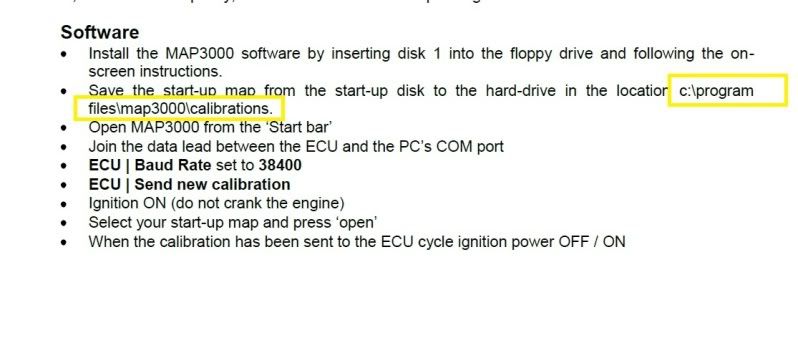
    Looking at the omex manual it says put the calibration file into the calibration folder on C drive. I can access the folder within map3000 software but i cant view it in windows explorer to place file into the folder

  7. #7
    Hmm, that's the only problem I ever had!? in that case it might be worth re checking your permanent, ignition and earth to your control unit!
    Also make sure your ignition is on (if I remember correctly as its been a while since my car was on the road lol)
  8. #8
    Quote:
    Originally Posted by Beaniemoo View Post
    Hmm, that's the only problem I ever had!? in that case it might be worth re checking your permanent, ignition and earth to your control unit!
    Also make sure your ignition is on (if I remember correctly as its been a while since my car was on the road lol)
    thats my job tomorrow is check all the earths etc and connections and try again
  9. #9
    anyone?
  10. #10
    Has your laptop got a rs232 port? If so I'd get a rs232-rs232 lead instead. You have lots of problems connecting with USB leads.

    If this doesn't work, try a different laptop (preferably older).
    When at Westfield we had about 4 different laptops due to some ecus being fussy.. No idea why.
  11. #11
    even mine on pred with a usb can be quite temperamental

    also...is the usb port your using suitable for the ecu, not all work in the same way, eg mine only talks to the ecu via one of the 3 ports on my laptop

    as with the internet...which is a diff port from the ecu one
  12. #12
    Quote:
    Originally Posted by dannygti View Post
    Has your laptop got a rs232 port? If so I'd get a rs232-rs232 lead instead. You have lots of problems connecting with USB leads.

    If this doesn't work, try a different laptop (preferably older).
    When at Westfield we had about 4 different laptops due to some ecus being fussy.. No idea why.
    No my laptop has a 15pin connection. I can get a cable that is 15pin to rs232(9pin) if that will work and give that a try.
  13. #13
    Try that then, they are a pain in the arse, I'm lucky I have a laptop that will work now after also faffing around with cables and drivers etc
  14. #14
    the 15 pin is a serial port and thats the best to use
    my windows 7 laptop wont talk to DTA's but will to Emerald via USB, i have to use my mercedes laptop with serial lead to talk to my DTA
  15. #15
    Quote:
    Originally Posted by dannygti View Post
    Try that then, they are a pain in the arse, I'm lucky I have a laptop that will work now after also faffing around with cables and drivers etc
    Will give it a try and update 2mo. fingers crossed i can get something to work.
  16. #16
    ok this morning i went to shop and it was closed.

    So i came home and tested a few things

    Got good power from battery
    Got power going to all fuse boxes.
    Earths are all checked and seem ok
  17. #17
    99% of ecu connection problems are usb adapter related.

    try a laptop with RS232 port.

    or a high quality usb serial adapter. you may have to alter comms speeds within windows as well as baud rate within map3000.

    make sure your ign. live to the ecu is constant.

    to remove problems with wiring, try an earth and power direct from a battery.

    or you can send ecu to us and we can bench test it to rule out any ecu problems.


    i would recommend buying an old panasonic toughbook or IBM thinkpad from ebay, £100-£200. these will have RS232 ports (9 pin serial) perfect for vehicle ecus, and rugged enough for mapping.. cheap too!

    - colin.
  18. #18
    Quote:
    Originally Posted by atspeedracing View Post
    99% of ecu connection problems are usb adapter related.

    try a laptop with RS232 port.

    or a high quality usb serial adapter. you may have to alter comms speeds within windows as well as baud rate within map3000.

    make sure your ign. live to the ecu is constant.

    to remove problems with wiring, try an earth and power direct from a battery.

    or you can send ecu to us and we can bench test it to rule out any ecu problems.


    i would recommend buying an old panasonic toughbook or IBM thinkpad from ebay, £100-£200. these will have RS232 ports (9 pin serial) perfect for vehicle ecus, and rugged enough for mapping.. cheap too!

    - colin.
    Thanks colin

    Are you in work today as need to give you a call
  19. #19
    Serial to USB connectors are a pain in the arse.

    You got the latest drivers for that specific model of lead/adapter? Never use the one that comes with it. Find the exact model/chip number and then search google for the latest driver.

    Worth checking for the latest version of software:

    http://omextechnology.com/page11.html#ECUDownloads

    If that still isn't working, as Colin said get a decent Serial to USB adapter and download the drivers and try again.
  20. #20
    Probably not any use to you just sharing my experience, when I tired to install the drivers that came with my serial-USB cable it only worked on one out of three laptops in my house, when the cable was installed I havet had any problems detecting my predator, I might try the above advice and search for different drivers to make it work on my other laptop